
In Windows Vista and Windows XP, whenever user disable an important security setting, a Security Center Alert icon will be displayed on the notification area at the taskbar (used to call system tray where the clock resides) with a warning message. The alert trigger events include the following:
- Disable Windows Firewall.
- Disable antivirus program.
- Do not install or uninstall anti-virus.
- Outdated virus definition and signature.
- Disable Automatic updates.
- Turf off User Account Control.
- Computer requires to restart after applying hotfix or update.
These security concerns is relatively minor and can be safely dismissed, especially if the issue is purposely or intentionally done. In this case, the WSC Alerts icon and message can be turned off so that the system no longer will trigger notification when a problem occurred.
- If you can see the Security Center shield icon in the notification area, simply double click on the icon to open Windows Security Center. Else, click on Windows Start button, select Control Panel, and then Windows Security Center.
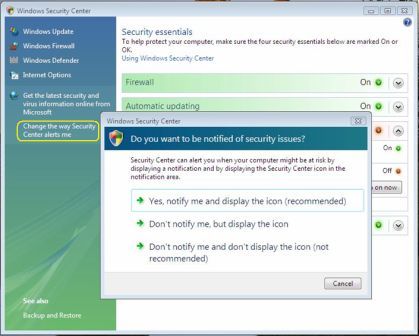
- Click on “Change the way Security Center alerts me” link in the left pane in Windows Vista. In Windows XP, it’s located under Resources section.
- In Windows Vista, choose either “Don’t notify me, but display the icon” or “Don’t notify me and don’t display the icon” option, with later as complete disable of all Security Center Alerts.
In Windows XP, a Alert Settings dialog box will appear. Clear the Firewall, Automatic Updates, and/or Virus Protection check boxes to disable the respective component’s alert, and then click OK.
 Tip and Trick
- How To Download HBO Shows On iPhone, iPad Through Apple TV App
- Windows 10 Insider Preview Build 19025 (20H1) for PC Official Available for Insiders in Fast Ring – Here’s What’s News, Fixes, and Enhancement Changelog
- Kaspersky Total Security 2020 Free Download With License Serial Key
- Steganos Privacy Suite 19 Free Download With Genuine License Key
- Zemana AntiMalware Premium Free Download For Limited Time