
Windows Vista Hybrid Sleep feature allows users to quickly put computer system into Sleep or Standby mode to save power electricity, yet able to come back to work at last active state right before computer sleeps without losing existing opened programs or data and having to start afresh again. If your PC seems like losing memory state after power outage while in Sleep state, forcing you to restart computer in clean state, try to enable and turn on Hybrid Sleep mode so that computer can recover from S4 hibernation mode instead, keeping your last working desktop state intact.
- Click on Start button, then go to Control Panel.
- Click on System and Maintenance link, then click on Power Options to run the applet.
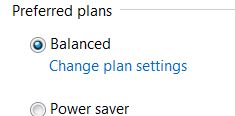
- Under the “Select a power plan” page, and the “Preferred plans” section, click on Change plan settings under the active selected power plan, i.e. the one which are ticked.
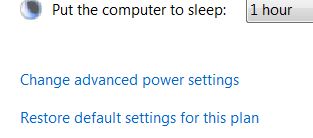
- On the “Change settings for the plan” page, click on Change advanced power settings.
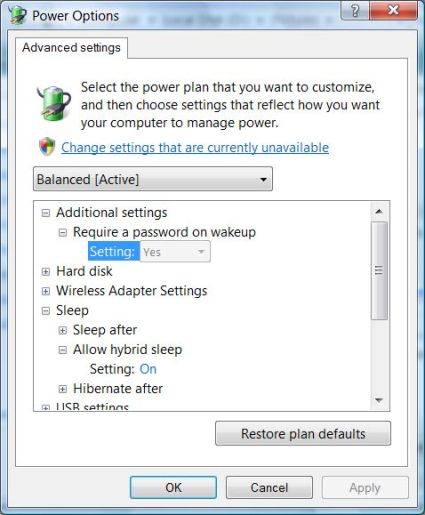
- On the “Advanced settings” tab of “Power Options”, expand Sleep tree, then expand Allow hybrid sleep subtree.
- Depending on your computer power configuration, you will see different options available:
For desktop computer relying on AC power, select On from the drop-down list of “Settings” option.
For notebook and laptop computer or probably those on UPS, there are 2 settings available – “On battery” and “Plugged in”. Select On from the drop-down list as the value for both options.
- Click on bottom “OK” button when done.
- Click “Save changes” if the button is not grayed out.
 Tip and Trick
- How To Download HBO Shows On iPhone, iPad Through Apple TV App
- Windows 10 Insider Preview Build 19025 (20H1) for PC Official Available for Insiders in Fast Ring – Here’s What’s News, Fixes, and Enhancement Changelog
- Kaspersky Total Security 2020 Free Download With License Serial Key
- Steganos Privacy Suite 19 Free Download With Genuine License Key
- Zemana AntiMalware Premium Free Download For Limited Time